![accrisoft_logo_med.png]](https://help.accrisoft.com/hs-fs/hubfs/accrisoft_logo_med.png?height=50&name=accrisoft_logo_med.png)
The WYSIWYG editor's Formats dropdown includes an Expandable/Collapsible Header option, which lets you organize page content into sections that visitors can expand and collapse for a cleaner reading experience. Follow the steps below to set them up.
Setting Up Collapsible Headers
- Add your content to the page in the WYSIWYG editor.
- Highlight the text of the first header you want to make collapsible.
Then open the Formats dropdown, and select Expandable/Collapsible Header.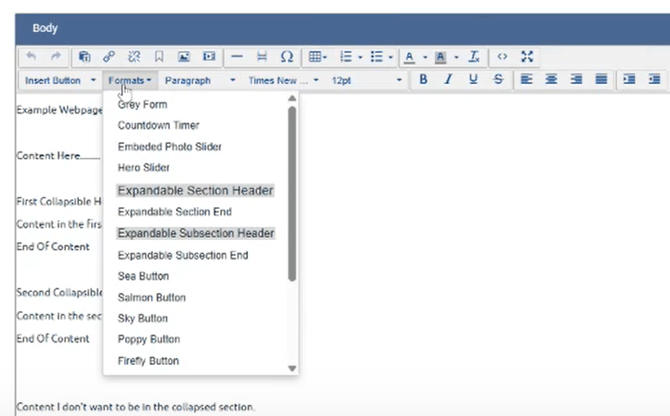
or.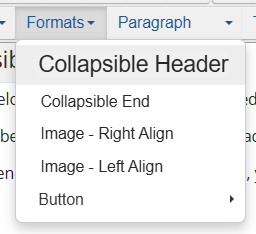
- Highlight the next header and apply the same format. This closes the previous section and opens a new one.
- Repeat for each additional header until all collapsible sections are configured.
- Once your last section's content is in place, press Enter to create a new line, then type a single space.
- Highlight the space, open the Formats dropdown, and select Collapsible Header End (also listed as Expandable Header End).
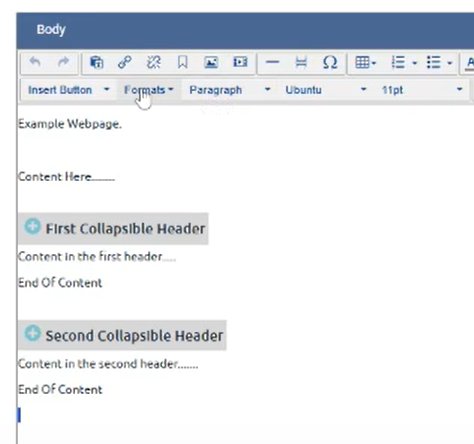
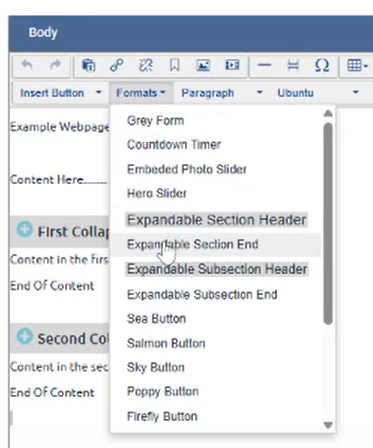
Any content added below that closing format will appear as normal page content, outside of the collapsible sections.
Note: Applying the Collapsible Header format to a new header simultaneously closes the previous section and opens the next. The closing step in step 6 is only needed after your final section to allow free content to follow.