![accrisoft_logo_med.png]](https://help.accrisoft.com/hs-fs/hubfs/accrisoft_logo_med.png?height=50&name=accrisoft_logo_med.png)
The Menus module in Freedom allows you to add, edit, delete, reorder, and hide navigation menu items across your site's menu groups.
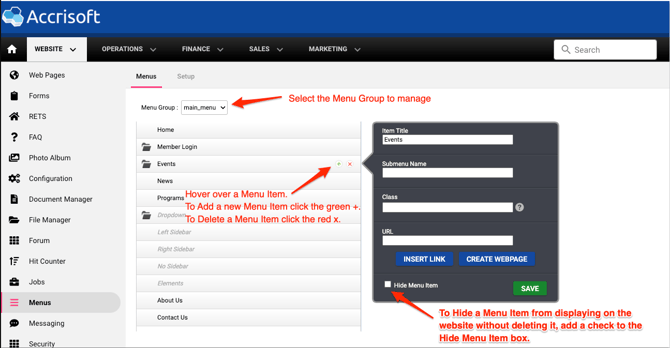
- Navigate to Website > Menus and select a Menu Group from the dropdown (e.g., main_menu).
- The menu items in that group will be displayed. Hover over an item to reveal the controls:
- Click the green + to add a new menu item below it.
- Click the red x — to delete the menu item.
- To reorder a menu item, click and drag it to a new position in the list.
- To hide a menu item from the site, click on the item to open its details, check Hide Menu Item, and click Save.