![accrisoft_logo_med.png]](https://help.accrisoft.com/hs-fs/hubfs/accrisoft_logo_med.png?height=50&name=accrisoft_logo_med.png)
Freedom provides different options for hiding pages depending on which module you are using. This article covers hiding pages in both the Web Pages module and the Pages module.
Web Pages module
The Web Pages module includes a Searchable checkbox that controls whether a page appears in your site's search results.
- Navigate to Website > Web Pages and edit the page you want to hide from search.
- Scroll to the General section at the bottom of the edit screen.
- Uncheck the Searchable checkbox and click Save.
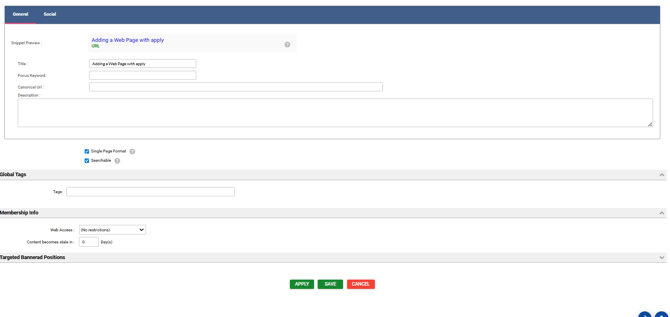
Note: Unchecking Searchable only removes the page from search results. The page itself remains accessible to users who have the direct URL and can still visit it.
Pages module
The Pages module includes a Visible on site checkbox that fully hides a page from your website.
- Navigate to Website > Pages and edit the page you want to hide.
- Uncheck the Visible on site checkbox.
- Click Save.
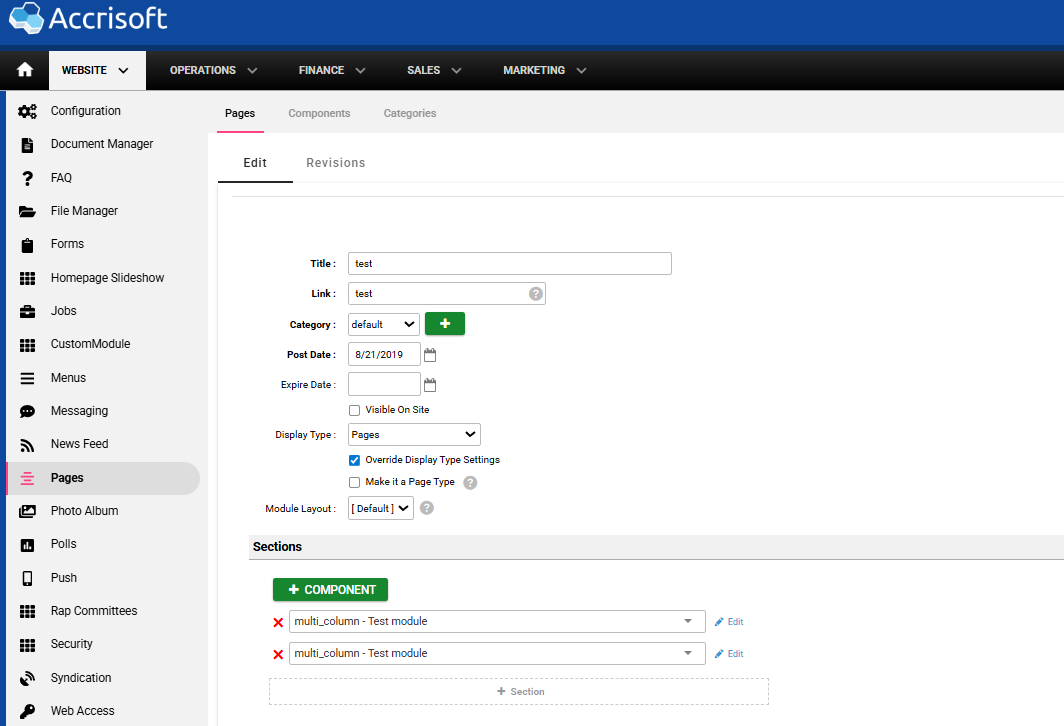
Important: When a page is hidden using the Visible on site checkbox, users who follow a direct link to that page will be redirected to the site's 404 error page, unlike the Web Pages searchable option.
Related articles
- How to create a webpage
- Pages vs. Web Pages modules
- Restricting content from certain viewers using the Web Access module